
Since PHP scripts must be unpacked into memory to be interpreted by the PHP runtime, it may be possible for a skilled hacker to extract portions of compiled PHP files. This could grant them access to any string stored in plain text within the PHP code, such as private passwords, database login info, etc.
To make this task more complicated and time-consuming, ExeOutput for PHP includes a String Protection feature.
The String Protection feature allows you to hide string constants by replacing them in your PHP code with a call to a special PHP function. This way, the strings do not appear in plain text in your PHP code.
To use this feature, define the strings you want to protect on the PHP Settings -> String Protection page. Each string is assigned a unique identifier. Then, replace all instances of those strings in your code with a call to the PHP function, using the corresponding identifier.
The prototype of the PHP function is:
string exo_get_protstring(string $stringid);For instance, suppose we have a password, “My Secret Password“, with the identifier “str1“. The name of the PHP function is exo_get_protstring.
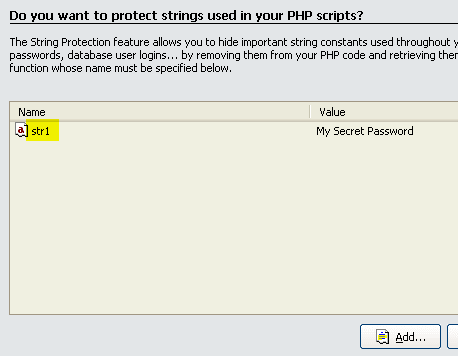
Instead of using this PHP code, which contains the password in plain text:
<?php
$pass = 'My Secret Password';
echo ("The password is: $pass");
?>
…use the following code instead:
<?php
$pass = exo_get_protstring('str1');
echo ("The password is: $pass");
?>
Tip
Advice: You should use non-descriptive identifiers for your strings.
The Comments button lets you associate an optional comment with the selected string. This comment is for your reference only and is not compiled into the application.


