
The Menu Bar component displays standard GUI menus at the top of the main window. By default, an application contains four predefined menu items: File, Edit, Navigate, and Help. These items provide various commands that let users navigate your web pages, select and copy text, print pages, and more.
To create a menu bar in your PHP application, add a Menu Bar to the “Components Used” list and then click Edit Menu.
The UI editor will appear, which includes a ready-to-use menu that you can modify.
In the UI editor, you can manage menu items, associate commands with them, and configure their properties. You can also reorder these items.
Manage Menu Items #
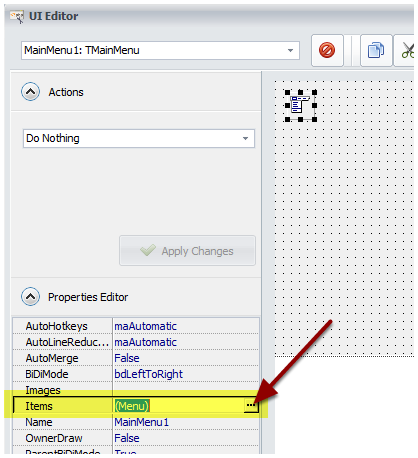
Select the
MainMenu1control (TMainMenu type).
In the Properties Editor, double-click
(Menu)corresponding to theItemsproperty.![In the Properties Editor, double-click on (Menu) corresponding to the Items property]()
Use the Menu Editor tree to manage menu items:
![]()

For the Caption property, you can use Resource Strings for easier localization. To insert a resource string, use %RESID% and replace RESID with the name of the resource string.
Menu Separator #
To create a separator, set a menu item’s Caption property to a single hyphen (-).
The action for a separator should be set to “Do nothing”.
Menu Captions #
If you associate a standard action with a menu item, its Caption property will be ignored. Instead, the compiled application will display the name of the action. You can modify these action names in the Localization editor.
Modify a Menu Item at Runtime #
It is possible to change any property of any menu item at runtime.
Refer to the dedicated topic “How To Modify Controls At Runtime“.


