
This is the official documentation for ExeOutput for PHP.
Description #
ExeOutput for PHP™ is a compiler that transforms PHP scripts and websites into stand-alone Windows desktop and console applications.

What’s New in ExeOutput for PHP 2025 #
ExeOutput for PHP 2025 introduces major new features and improvements:
- New Rendering Engine: Microsoft Edge WebView2. A new option to use the modern WebView2 runtime, resulting in a drastic reduction in EXE file size (around 20 MB vs. 150 MB with CEF). You can easily switch between WebView2 and CEF with a single click in the application settings. See the updated topic about rendering engines.
- Upgraded Chromium Engine (CEF): The CEF engine has been updated to version 139.0.38.
- Updated PHP Runtimes: Initial support for PHP 8.5 (beta) and updated versions for PHP 8.4, 8.3, 8.2, and 8.1. See available PHP versions.
- New Compression Engine: Faster and more efficient multi-threaded file compression with Zstandard (zstd).
- And many other improvements: including enhanced security, bug fixes for popups and multi-instance execution, and UI enhancements. A full list of changes is available in the release notes.
With ExeOutput for PHP
Convert PHP scripts, websites, JavaScript, HTML, and databases into stand-alone Windows applications (single EXE files) that do not require a web server or a separate PHP distribution. Build fully-customizable desktop applications with PHP, HTML, and JavaScript, with no additional skills required.
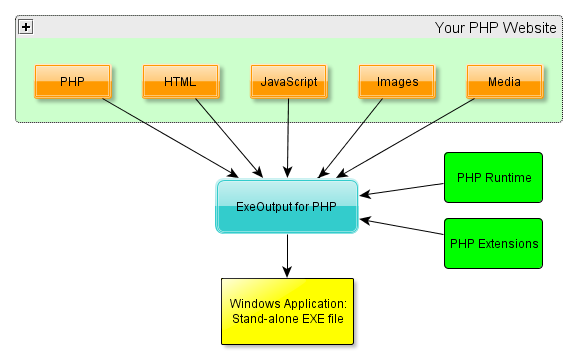
Create a single EXE for Windows: ExeOutput for PHP packages the PHP runtime and all project files (PHP, HTML, JavaScript, assets, databases, etc.) into one stand-alone EXE. The files are compressed and protected, ensuring they cannot be extracted later with a decompiler or an archive tool like 7-Zip.
![combine PHP scripts to EXE]()
The executable is stand-alone: the PHP runtime is embedded within the EXE and is never unpacked to the hard disk.
- You can choose the PHP version you want to use, from PHP 7.3 to PHP 8.5.
- PHP scripts are executed directly from memory and are never unpacked to the hard disk.
- You can create console (non-GUI) and command-line applications from PHP scripts. PHP runs in PHP CLI mode.
- Applications are rendered using the Chromium Embedded Framework (CEF) v3 engine. No third-party software is required, making the applications you build fully stand-alone.
- Basic PHP extensions are supported and can be embedded within the EXE. Database engines like SQLite are handled seamlessly by the PHP engine. Additionally, your applications can connect to remote database servers such as MySQL.
- PHP pages and websites are displayed in a custom, secure browser environment. Standard navigation tools and menu commands are available and can be customized to your needs.
- Design unique GUIs for your applications, including skins, ribbons, toolbars with custom buttons, menus, tray icons, alpha-blended splash screens (32-bit PNGs), and more.
- Use existing PHP functions and extensions in your applications, such as cURL, graphics, XML, PDF, Zip, databases, and more.
- AJAX functionality, secondary windows, and pop-ups behave as expected.
- Optionally, let users access your application through their standard web browser (
localhost:port) using the built-in HTTP server. - HTML5 and CSS3 are fully supported.
- Debugging tools like the CEF Developer Tools and XDebug are included.
- Support for open audio and video formats and WebRTC is included.
- Optimized for high-DPI and 4K screens, as well as multi-monitor setups.
- Features for printing, kiosk printing, and exporting to PDF are available.
- No web server required: no port or firewall conflicts to worry about.
- Optionally, you can include an external HTTP server to allow external web browsers to access your application via
http://localhost:port. - Include a portable MySQL (MariaDB) server with your PHP application that starts and stops automatically with it.
- Supports various database servers.
- EXE customization allows you to use your own icon and version information.
- Applications can be digitally signed with a code signing certificate (Authenticode with SHA-256), avoiding security warnings in Windows.
- ExeOutput includes its own scripting engine (HEScript), which can be combined with PHP and JavaScript.
- Create portable applications.
- Add optional licensing features to sell licenses for your PHP apps with Obsidium.
- Disable printing functionality across the entire application, preventing users from printing any content.
- Full Unicode support is provided for the application, though PHP itself is not Unicode-compatible.
- Compatible with various PHP frameworks.
- Project settings are managed with an intuitive GUI featuring a Windows Ribbon-style interface.
- Easily deploy applications with integrated Zip archive or installer creation.
- Compatible with Windows 7 through Windows 11.

How to Use This Documentation #
- Browse topics with the table of contents on the left to discover ExeOutput for PHP’s features.
- Press F1 in the application to open the help topic related to the current page.
- Use the search engine to find information on a specific topic.
- If you have questions, feedback, or bugs to report, visit our forum at gdgsoft.info or contact us by email at
[email protected](remove NOSPAM).


