
How Redirection and Routing Work #
The redirection feature in ExeOutput for PHP lets you redirect users from an old page to a new one. For frameworks, it can also redirect all requests to a single router script.
Warning
Redirection support is disabled by default. You must enable this feature in ExeOutput for PHP by going to PHP Settings => Main Settings and checking the Enable custom router handler in HEScript (OnRouterURL event) option.
Info
If you do not need redirection, it is best to leave this feature disabled, as it can slightly increase the internal server’s processing time.
Adding Redirection Rules #
Once redirection support is enabled, the OnRouterURL HEScript event, available in the UserMain script, is invoked for each server request.
Consider the UserMain script below:
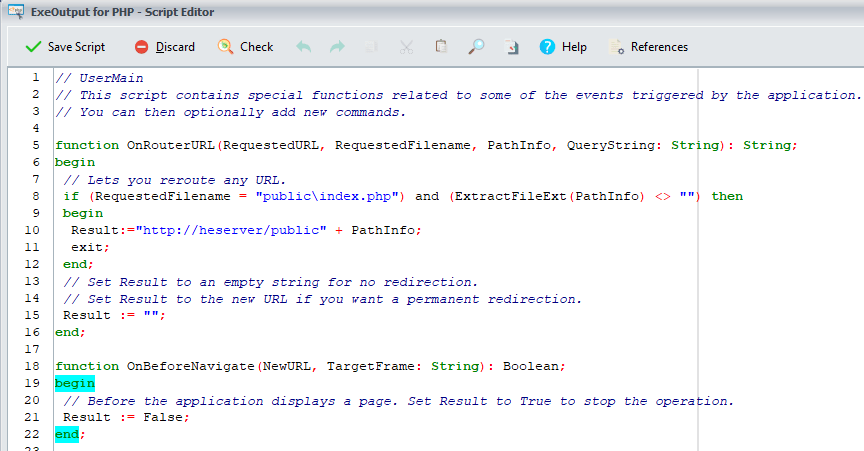
function OnRouterURL(RequestedURL, RequestedFilename, PathInfo, QueryString: String): String;
The following parameters are passed to the event:
RequestedURL: The full request URL.RequestedFilename: The virtual path to the requested file.PathInfo: Represents the value of thePATH_INFOvariable as defined for PHP: any client-provided pathname information that trails the script filename but precedes the query string.QueryString: The query string, if any (the text after?in the URL).
The engine performs a redirection only if the function’s Result is set to the new URL. To avoid redirection, return an empty string.
Redirection Example #
Note
The base URL of your application depends on the rendering engine. This example uses https://heserver/ (CEF). For WebView2, you would use https://heserver.example/.
The router script (which is also the homepage) is public\index.php. The framework in this sample generates URLs such as https://heserver/public/index.php/assets/image.png. Since the Chromium engine cannot resolve these URLs directly, we must rewrite them:
function OnRouterURL(RequestedURL, RequestedFilename, PathInfo, QueryString: String): String;
begin
  // Reroute any URL.
  if (RequestedFilename = "public\index.php") and (ExtractFileExt(PathInfo) <> "") then
  begin
    Result := "https://heserver/public" + PathInfo;
    exit;
  end;
  // Set Result to an empty string for no redirection.
  // Set Result to the new URL if you want a permanent redirection.
  Result := "";
end;
For instance, the script above transforms the URL:
https://heserver/public/index.php/assets/image.png
into:
https://heserver/public/assets/image.png


