
Large source files, such as videos and other media resources, can be kept outside of the application to significantly reduce loading times. Initially, all files compiled into the application’s .exe must be unpacked into memory to be accessible. This unpacking step requires time, which can be substantial for very large files.
To minimize loading time, you can store your files externally to the application’s EXE file. This way, the application only needs to load them, not unpack them.
Warning
External files must be deployed alongside the application’s .exe file. Therefore, using an installer for your application is the best deployment method. Installers generated by ExeOutput for PHP can include external files in the Data subfolder.
Keeping Large Amounts of Files External #
Some PHP applications may contain tens of thousands of files. Compiling these directly into your application can significantly slow it down. Keeping your files external, however, ensures that your application’s performance remains high, even when compiled with ExeOutput for PHP, compared to a server-hosted environment.
Important
We recommend keeping file-heavy and non-essential directories external to the application’s EXE file. Directories such as vendor or framework dependencies, which are often open-source, do not need protection and can thus be stored externally.
Setting a File as External #
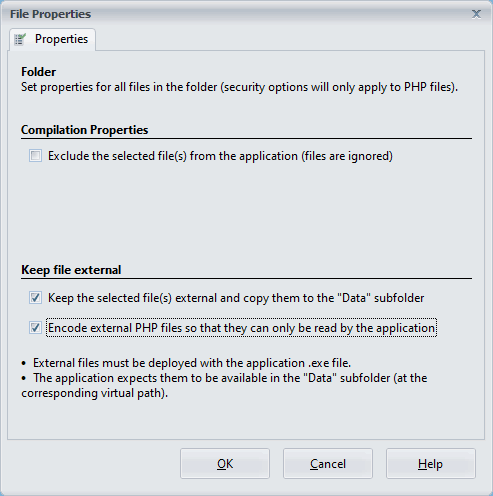
To designate a file as external, select it in the File Manager and click Properties. The “File Properties” window will appear; enable the Keep the selected file(s) external option. ExeOutput for PHP will automatically copy the external files to the appropriate location in the Data subfolder.
Important
If external files already exist in the destination folders, they will be overwritten by ExeOutput for PHP if the source file is more recent than the one in the destination folder.
Encoding External PHP Files for Enhanced Security #
ExeOutput for PHP allows you to encrypt external PHP files, ensuring that their contents can only be accessed by the application and remain hidden from users.
The downside is that external files will be encrypted during each application compilation, extending the compilation time when encryption is used. It also slightly reduces the application’s performance, as it introduces an additional decryption step that must be executed at runtime when running the external encrypted PHP scripts.
Note
A new encryption key is generated with each build of your application, preventing external encrypted PHP files from being shared between different applications.
See also: File Properties Editor


