
The “Context Menu” component controls the menu that appears when a user right-clicks. It gives users access to the most-used commands.
You can add your own items to the context menu with the UI editor (click Edit Items).
When you select the “Context Menu” component in the “Components Used” list, the following properties become available:
- DisableContextMenu: Set to
Trueto remove the context menu. - DisableOpenLinkNewWindow: Disables the “Open Link In New Window” menu item that appears when users right-click links on your webpages. ExeOutput for PHP handles secondary windows and pop-ups.
- EnableShowSourceCode: This can be useful for debugging. If this option is
True, the “Show Source Code” menu item will be displayed, allowing you to inspect the full source code of the current HTML page.
Edit Context Menu Items #
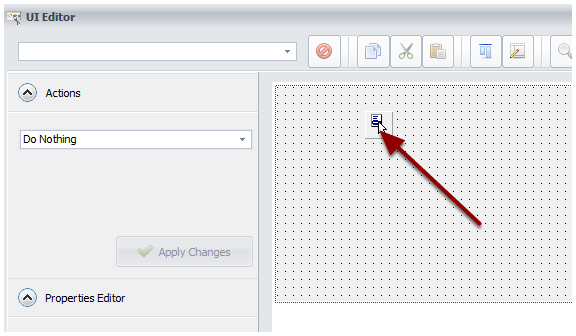
Click Edit Items, and the UI editor will be shown.
Select the TPopupMenu control.
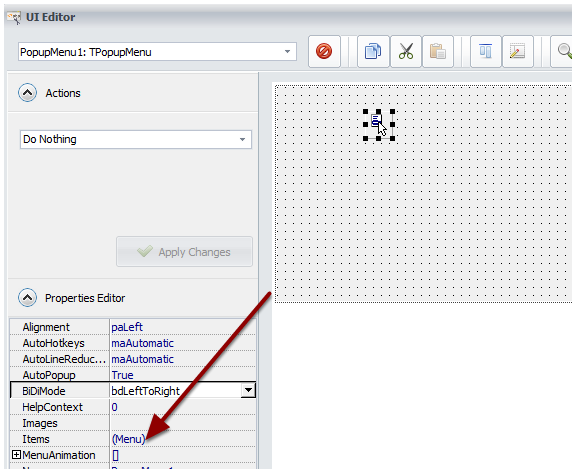
Double-click on
(Menu)in the Properties Editor.![Double-click on (Menu) in Properties Editor]()
Click “New Item” to add a new item, or “New Sub-item” to create a child item.
![Click "New Item" to add a new item or "New Subitem" to create a child item]()
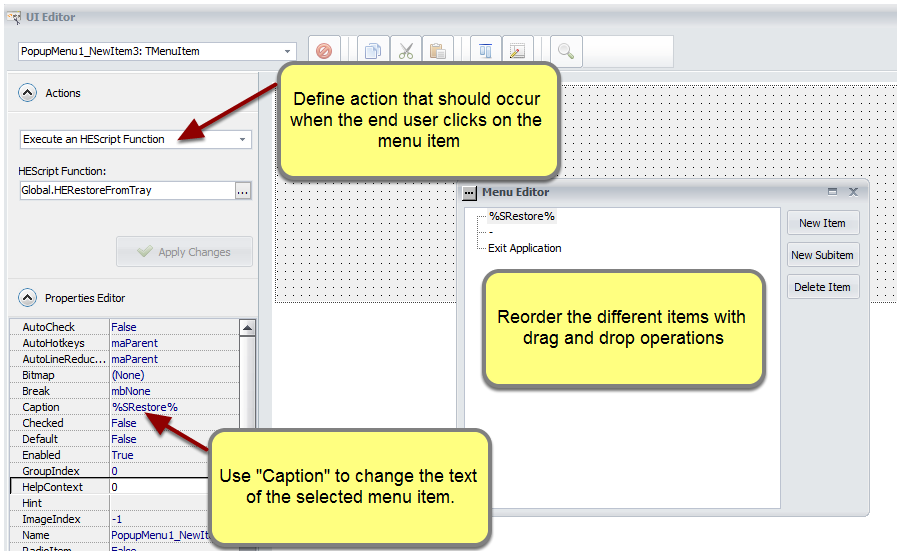
For the Caption property, you can use Resource Strings for easier localization. To insert a resource string, use %RESID% and replace RESID with the name of the resource string.


