
ExeOutput for PHP can create console applications without a graphical user interface (GUI). These applications operate as if PHP were executed in CLI mode.
You decide whether to create a GUI or a console application when starting a new project. This choice is final. The ExeOutput for PHP status bar indicates whether you are working on a GUI or a console application:

ExeOutput for PHP creates a single, stand-alone executable file. Users simply launch the resulting EXE file. No PHP installation is necessary. All compiled files are automatically loaded into the PHP runtime upon request.
By default, the index page script runs at startup. You can specify a different command line on the PHP Settings => Main Settings page.
Warning
Console applications cannot prompt for elevated rights. Use an administrator command prompt to perform administrative tasks.
The exo_get_resstring function can be used to protect resource strings.
Warning
Many ExeOutput for PHP features are not supported by console applications, including global variables, global protection (security), and HEScript scripting.
Accessing the Folder Containing the .EXE File #
Do not use $_SERVER['DOCUMENT_ROOT'] in a console application, as the $_SERVER variable is empty in this context (a console app does not run on a server or handle HTTP requests). Instead, you can retrieve the full path to the directory containing the EXE file by using the EXOPHPEXEPATH environment variable, as shown below:
<?php
$exoexepath = getenv('EXOPHPEXEPATH');
print($exoexepath);
?>
This prints the full path of the EXE’s directory. For example:
<?php
print(getenv('EXOPHPEXEPATH'));
?>
Additionally, you can access the virtual “Data” subfolder using the EXOPHPDATAPATH environment variable. For instance:
<?php
print(getenv('EXOPHPDATAPATH'));
?>
Script Example #
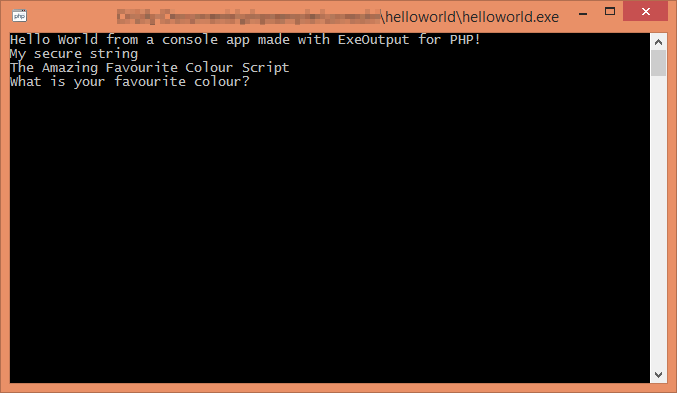
The following code was used to generate the console application screenshot shown above.
<?php
print("Hello World from a console app made with ExeOutput for PHP!\n");
print(exo_get_protstring('str1'));
fputs(STDOUT, "\nThe Amazing Favorite Color Script\n");
fputs(STDOUT, "What is your favorite color? ");
$sometext = strtolower(trim(fgets(STDIN, 256)));
fputs(STDOUT, "Your favorite color is $sometext!\n\n");
?>


